
The easy PDF editor for everything you do with PDFs.
Easy PDFs is a complete PDF editor for Windows. Change the text in any PDF in its original font, convert PDFs to and from Word, Excel and PowerPoint, fill and sign forms, make scans searchable, redact for real, and merge, split, compress and protect - all on your own PC, with nothing uploaded.
Every PDF tool you need, without the monthly bill.
Most PDF editors are rented by the month and send your files to the cloud. Easy PDFs does the same jobs on your own PC, for one price.
Edit and review
Edit text and images in any PDF
Click into existing text and change it - Easy PDFs matches the original font, using the embedded font, then an installed one, then the closest standard font. Move whole paragraphs, add text boxes, replace or delete images, and add web, email and page links, headers, footers and watermarks.
Annotate, highlight and stamp
Highlight, underline and strike through, add sticky notes and comments, draw shapes, arrows and freehand, and use 12 ready-made dated stamps such as APPROVED, CONFIDENTIAL and DRAFT.
Fill, create and sign forms
Fill in any form, create your own fields or let Easy PDFs detect them, then flatten the result. Draw, type or import your signature and initials and place them anywhere.
True redaction, and compare two versions
Redact by search term, by pattern (emails, phone, card, bank and ID numbers) or by area, and the content is removed from the file - not just covered with a black box. Compare two versions of a document page by page to see what changed.
Convert and create
Convert PDF to Word, Excel and PowerPoint - and back
Export PDFs to Word, Excel, PowerPoint, images or text, with scanned pages read by OCR first. Create PDFs from Word, Excel and PowerPoint files, images including iPhone HEIC photos, emails (.eml and .msg, with their attachments), text files and web pages.
Scan and OCR
Scan straight from your scanner, or open scanned PDFs and images, and OCR turns them into searchable, selectable PDFs - one file or a whole folder with the batch tool. English OCR is built in.
Organize and output
Merge, split and organize pages
Merge files, split every N pages, by ranges, by bookmarks or by size, and reorder, rotate, crop, delete, extract and insert pages with thumbnails.
Combine and bundle
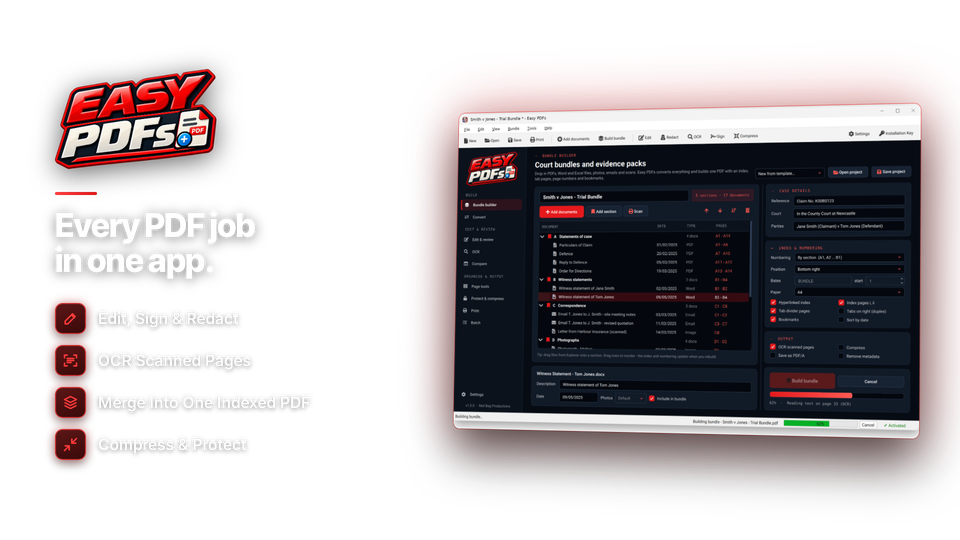
Build one organised PDF from many files with sections, a cover page, a linked contents page, tabs, bookmarks, and page or Bates numbering in your chosen font - ready for tenders, claims and case files.
Protect, compress, print and batch
Lock PDFs with AES-256 passwords and permissions, remove metadata, save as PDF/A and shrink files for email. Print at fit, actual size or a custom scale with margins, as booklets or 2, 4 or 9 pages per sheet. Run saved actions - compress, watermark, Bates, OCR, protect or Office export - over a whole folder.
The PDF jobs people do every day - all in one place.
Open a PDF, or start from the Home screen's tool tiles, and pick the job.
| I need to… | Easy PDFs tool | Typical example |
|---|---|---|
| Change text in a PDF | edit text | Update a price list, date or address |
| Turn a PDF into Word or Excel | create & export | Reuse a report or a table of figures |
| Combine or split PDFs | organize pages | Join a month of invoices into one file |
| Sign or fill in a form | sign, forms | Sign a lease, contract or application |
| Make a PDF smaller | protect & compress | Fit a brochure under an email limit |
| Make a scan searchable | scan & OCR | Search old letters and receipts |
| Hide private details | redact | Remove names and account numbers before sharing |
| Lock a PDF with a password | protect | Send payslips or medical letters safely |
| Build an indexed document pack | combine & bundle | Tenders, claims, case files, court bundles |
From download to done in four steps.
Install it, open a file, pick a tool, save. No account and no upload.
Install
Windows 10 or 11, 64-bit.
key XXXX-XXXX-…
Open a file
Drag in a PDF, Office file or scan.
pages 14
Pick a tool
Edit, sign, convert or organize.
font matched
Save
As PDF, Word, Excel and more.
uploaded 0

For anyone who works with PDFs.
Forms, letters and receipts
Sign a lease, fill in an application, fix a typo in a letter and shrink a PDF to fit an email - without a subscription.
Everyday documents, done
Convert reports to Word and Excel, merge invoices, password-protect payslips and redact customer details before sharing.
Organised document packs
Build indexed bundles with a linked contents page, tabs and Bates numbers, and make old scans searchable.
One license. Every feature. Yours to keep.
Editing, converting, OCR, signing, redaction, bundles and batch processing are all included. No subscription. Free updates.
- PDF toolsall included
- Filesno page or size limit
- Works onWindows 10 & 11 (64-bit)
- Updatesfree
- Activations1 PC
- Deliverydownload + key by email
Checkout
You'll go straight to your download page once payment is confirmed, and we'll email your download link and license key.
Already bought? Get your download link again.
PDF editor questions, answered.
Can I edit the text in a PDF?
Yes. Click into existing text and change it, and Easy PDFs matches the original font. You can also move paragraphs, add text boxes, replace or delete images, and add links, headers, footers and watermarks.
Can it convert PDF to Word and Excel?
Yes - and to PowerPoint, images and text. It also works the other way, creating PDFs from Word, Excel, PowerPoint, images, emails, text and web pages. Scanned PDFs are read with OCR first.
Can I merge, split and compress PDFs?
Yes. Merge files, split every N pages, by ranges, by bookmarks or by size, reorder, rotate and extract pages, and compress PDFs to fit email and upload limits.
Can I fill in and sign PDF forms?
Yes. Fill in any form, create your own fillable fields or detect them automatically, flatten the result, and sign by drawing, typing or importing your signature.
Can it make scanned documents searchable?
Yes. Built-in OCR turns scans into searchable, selectable PDFs, for one file or a whole folder with the batch tool. You can also scan straight from your scanner.
Does redaction really remove the text?
Yes. Redacted text, images and areas are removed from the file, not just covered, and you can redact by search term or by pattern such as email addresses, phone numbers and card, bank or ID numbers.
Can it build indexed bundles and document packs?
Yes. Combine & bundle builds one PDF from many files with sections, a cover page, a clickable contents page, tabs, bookmarks and page or Bates numbering.
Can I compare two versions of a PDF?
Yes. Compare shows the differences between two versions of a document page by page.
Does it work offline?
Yes. Everything runs on your own PC and your files are never uploaded. The internet is only used to activate your license and check for updates.
Which versions of Windows are supported?
Easy PDFs runs on 64-bit Windows 10 and Windows 11.
Can I try it before buying?
Yes. Install Easy PDFs and you can open PDFs and look around every tool and setting. Saving, exporting and the PDF tools unlock when you enter your installation key.
Is it a subscription?
No. It is a one-time payment of $59.95 with free updates.
How do I get the software after paying?
You go straight to your download page once payment is confirmed, and your download link and installation key are emailed to you. In Easy PDFs, choose Settings > Enter Installation Key and click Activate.
Every PDF job, one app you own.
Edit, convert, sign and protect PDFs offline on your PC. One license, no subscription.
Get Easy PDFs · $59.95